
The easiest way to wreck a gaming PC flip is to fall in love with the build before you have checked whether the numbers work. I have done it: kept adding parts because the rig was nearly there, then found the resale never justified the pile. What you actually need first is a profit check, a quick honest look at cost basis, expected resale, and margin, before the parts pile grows into a problem.
This is where I use FliprForge. Not after the build is finished and I am pretending it was a plan all along, but before I buy the next “cheap” part that somehow becomes another £38. Build the rig in the app, then run its AI Insights review and let it ask the awkward question: does this still make sense at this cost, for this resale, with these parts?
Why PC Build Profit Matters Before You Buy Parts
The build is not the business. The margin is. It is easy to keep buying parts because the rig is nearly there, and then discover the gaming PC resale value never justified the spend.
You will get the best result if the app has the real picture:
- the parts you already own are in stockpile
- the purchase costs are entered properly
- the rig you are planning reflects the machine you are actually trying to build
If the inputs are vague, the profit check will be vague too.
Step 1: Build the Rig Honestly
Start in the rig workflow and build out the machine honestly.
That means:
- assign the stock parts you really plan to use
- include the weaker parts you are tempted to gloss over
- leave gaps visible if the build still needs storage, cooling, or other pieces
- do not quietly assume a part upgrade you have not sourced yet
The point here is not to make the build look good. The point is to make the build true.
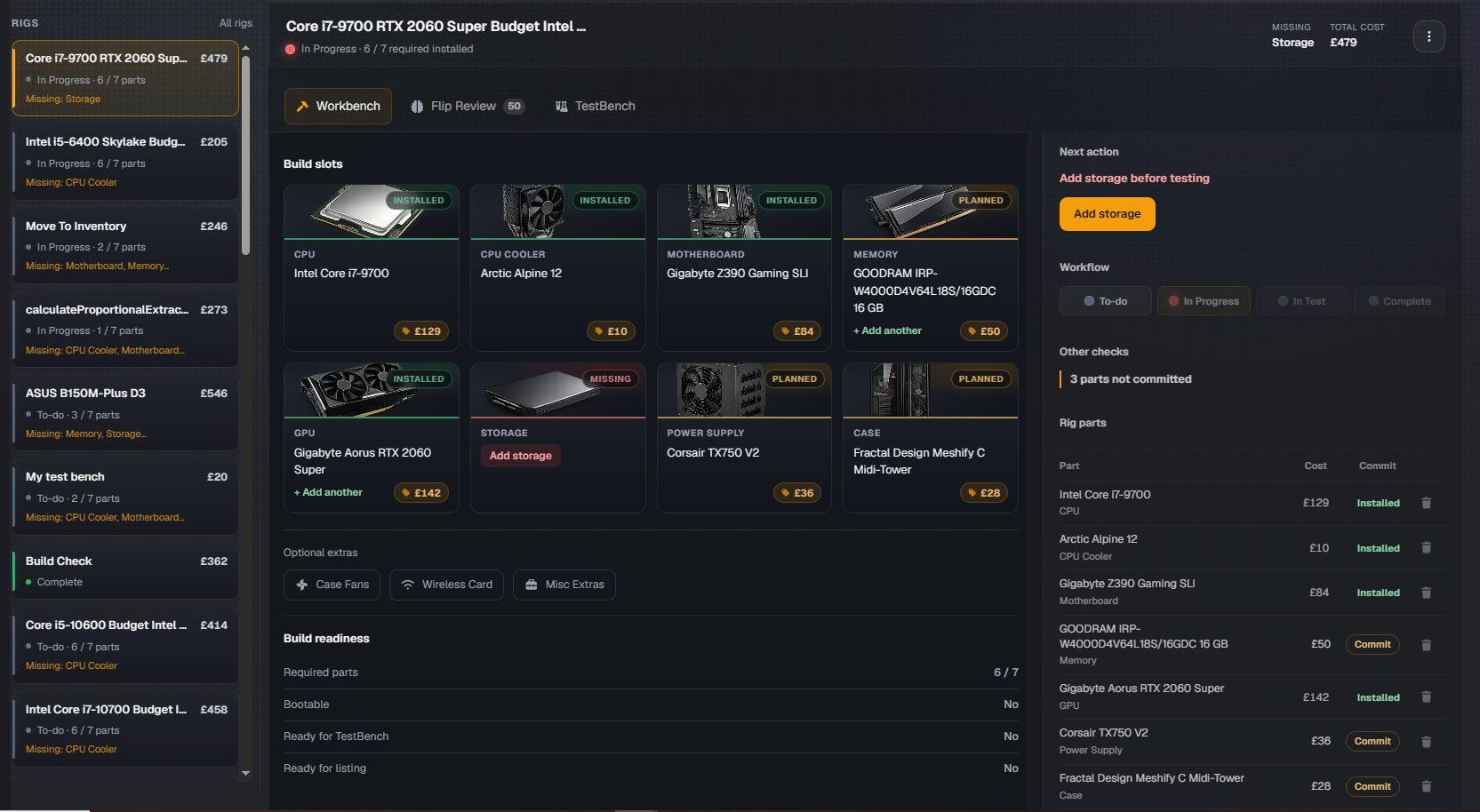
Build the rig honestly first. The missing storage slot is useful information, not something to hide.
Step 2: Check the Current Cost Basis
Once the rig is assembled in the app, stop and look at the cost basis.
This is where people usually start lying to themselves a bit. They mentally round down the donor cost, ignore the extra storage, forget the fan splitter, or treat the spare cooler as if it arrived by magic. That is exactly the used PC parts pricing that quietly kills margin.
The build cost stays attached to the actual rig, so it is one real number you can trust, not a guess spread across tabs and sticky notes.
Before you run the review, make sure that basis reflects reality as closely as possible.

This is the pause point. If the basis is already higher than you expected, fix that before you spend more.
Step 3: Run AI Insights Before Buying More Parts
Now run the flip review.
This is the step that turns “I think this should work” into something you can actually challenge.
In the rig view, AI Insights gives you a profitability and resale review, including signals like:
- current cost
- target buy-in
- expected resale
- expected profit
- confidence
- flip score
- resale appeal
- risk
That is far more useful than just looking at the total and hoping the market will be kind.
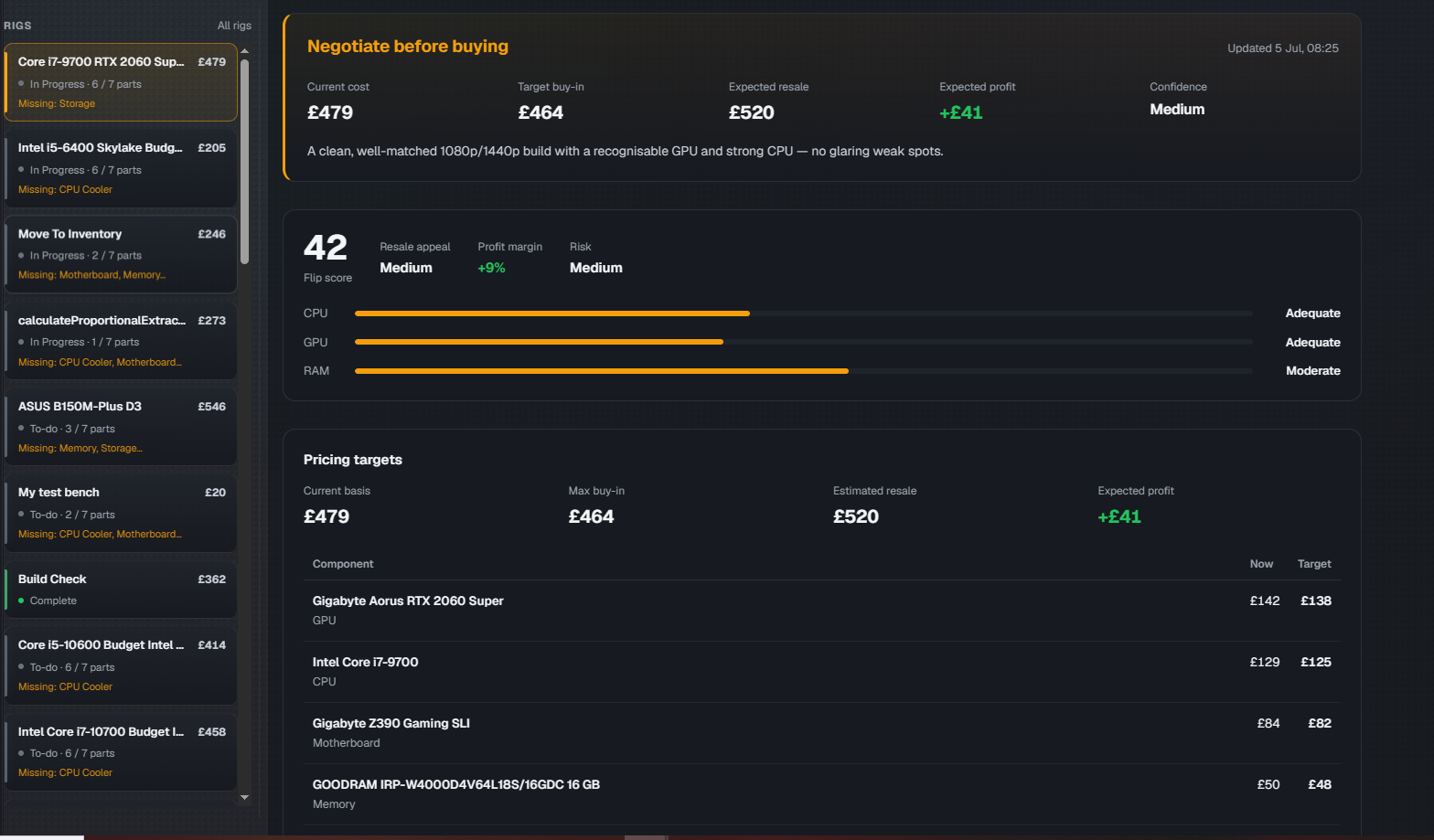
Once the review runs, you get a much clearer answer than “maybe it will sell”. You can see whether the build still works on cost, margin, and confidence.
Step 4: Read the Target Buy-In First
This is the number to pay attention to.
The target buy-in is the app’s way of saying: if you want this build to clear the profitability thresholds properly, this is roughly where the total cost needs to land.
That gives you a much stronger decision point than raw instinct. If the target buy-in is:
- above your current basis: good, the build has room
- close to your current basis: proceed carefully, there is not much slack
- well below your current basis: the app is warning you that this flip is too expensive in its current form
That does not always mean “kill the build”. It often means: source a key part more cheaply, use a different case, stop chasing a spec tier the resale ceiling will not support, or save one expensive component for another machine.

Read this card first. It tells you whether you are still buying like a flipper or drifting into hobby-builder logic.
Step 5: Use Per-Part Pricing Targets
If the build is too expensive, do not just shrug at the total. Go to the per-part target prices.
That is where you see which parts are pushing the build too hard, and what buy-in would actually make them work.
Use that to decide whether to:
- negotiate harder on a GPU
- wait for a better motherboard deal
- downgrade a cosmetic part that is eating margin
- stop upgrading a build that already has enough resale appeal
This is the bit I actually open the app for. The total tells you that you overspent. The per-part targets tell you which part to go and argue about.
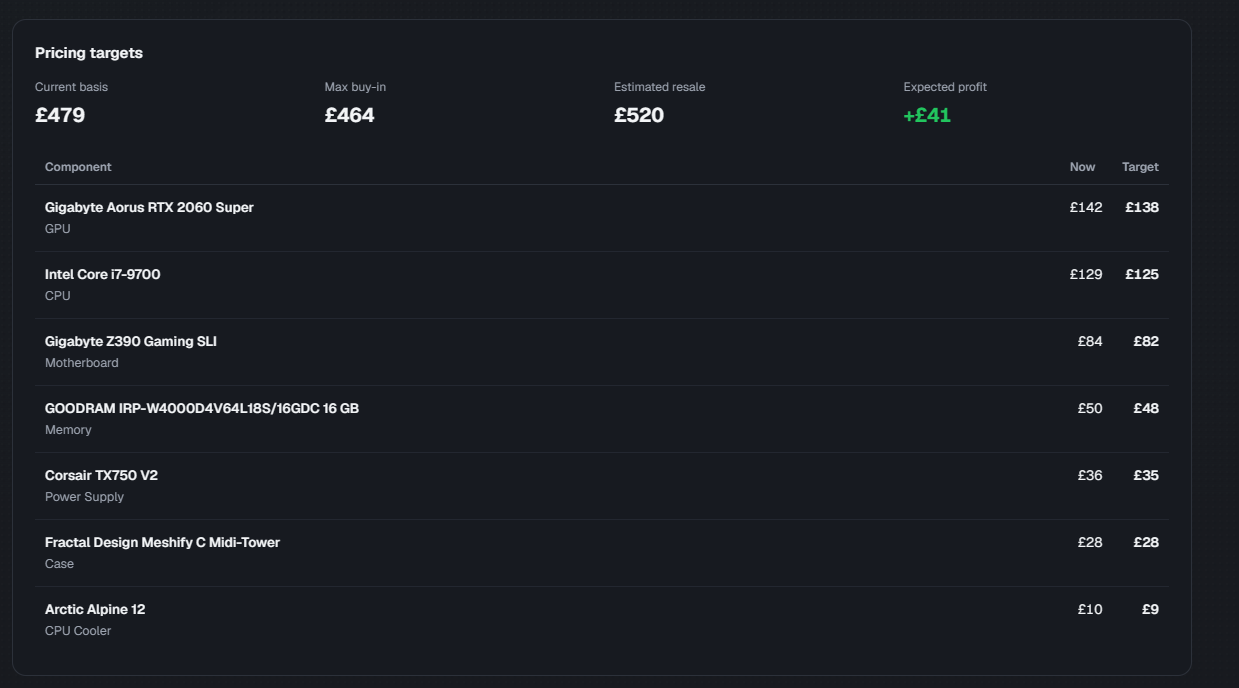
This is where the app becomes operational. You can see exactly which part is expensive, and by how much.
Step 6: Check Risk, Bottlenecks, and Resale Appeal
The review is not just about “is this fast enough”. It is also useful for asking whether the build is awkward to resell.
Look at:
- bottlenecks
- recommended actions
- risk readouts
- resale appeal
You are not trying to build the world’s most balanced benchmark machine. You are trying to build something that makes sense for the cost, photographs well, performs credibly, and can be sold without a long explanation.
If the app hints that a part weakens the whole resale story, pay attention. Use the flip score, resale appeal, profit margin, and risk as a selling-readiness check, not just a performance check.
Step 7: Use Listing Notes Before You Write the Ad
One of the better parts of the workflow is that the review does not stop at the build economics. It also gives you listing notes, which is useful because the planning stage should feed the sales stage.
If the app is already helping you frame:
- what the build is strongest at
- what needs careful wording
- what makes the resale story clearer
then you are saving yourself time later and reducing the chance that the listing drifts away from the actual machine.
Example: When the Target Buy-In Says No
Here is what “too expensive” actually looks like in numbers. Say you are planning a mid-range gaming PC flip in the UK:
Current build cost: £390
Expected resale:    £440
Extra costs / fees: £25
Target buy-in:      £330
Likely profit:      too thin
On paper the £390 to £440 gap looks like a £50 win. Then the fees take £25, and you are left with £25 before you have counted your time. Worse, the target buy-in is £330, which means the numbers only clear a proper margin if the whole build had cost around £330, not £390.
That £60 gap between your basis and the target buy-in is the real message. It is not telling you to bin the build. It is telling you to find £60 somewhere: negotiate the GPU down, swap the case, or hold a pricey part back for a stronger machine. Fix the buy-in before you touch the hardware, and a thin flip becomes a sensible one.
Why FliprForge Beats a PC Flipping Spreadsheet
A PC flipping spreadsheet records what you already spent. It cannot naturally tell you what the build should have cost, or which part to renegotiate next. That is the difference between a ledger and a decision tool.
Once you are juggling loose parts, multiple rigs, test status, and listings, the spreadsheet stops being simple and becomes manual admin. If you want the longer argument, see why a PC flipping spreadsheet breaks down once you scale.
The Honest Catch
AI Insights is advisory only. That is the right design choice.
It can help you spot risk, pressure-test a build, and suggest sensible buy-in targets. It cannot magically know the exact condition of a part, what your local buyers will tolerate this week, or whether a weird bundle will still sell because the photos are strong.
So when you work out how to price a used gaming PC, always check:
- real marketplace comps
- exact condition
- missing accessories
- local demand
- platform quirks and fees the AI may not fully price in
The Verdict
If you want a real how-to: plan the rig properly, check the cost basis, run AI Insights early, read the target buy-in before you spend more, and let the per-part pricing targets tell you where the build is getting too expensive.
That is the workflow. Build it explicitly in FliprForge, then let the review make the economics harder to ignore.
Open FliprForge, build the rig the way you are genuinely planning it, and screenshot the review as soon as the app gives you the first uncomfortable number. That is usually the part trying to save your margin.