Every gaming PC budget eventually turns into an argument with yourself, and the graphics card wins that argument nearly every time it’s allowed to. Dump every spare pound into the GPU, or spread it about and buy a bit more CPU, a bit more cooling, a bit more everything? It sounds like a personality question. It isn’t. It has a fairly clear answer, and the answer changes depending on exactly where you sit on the price ladder.
The Quick Take
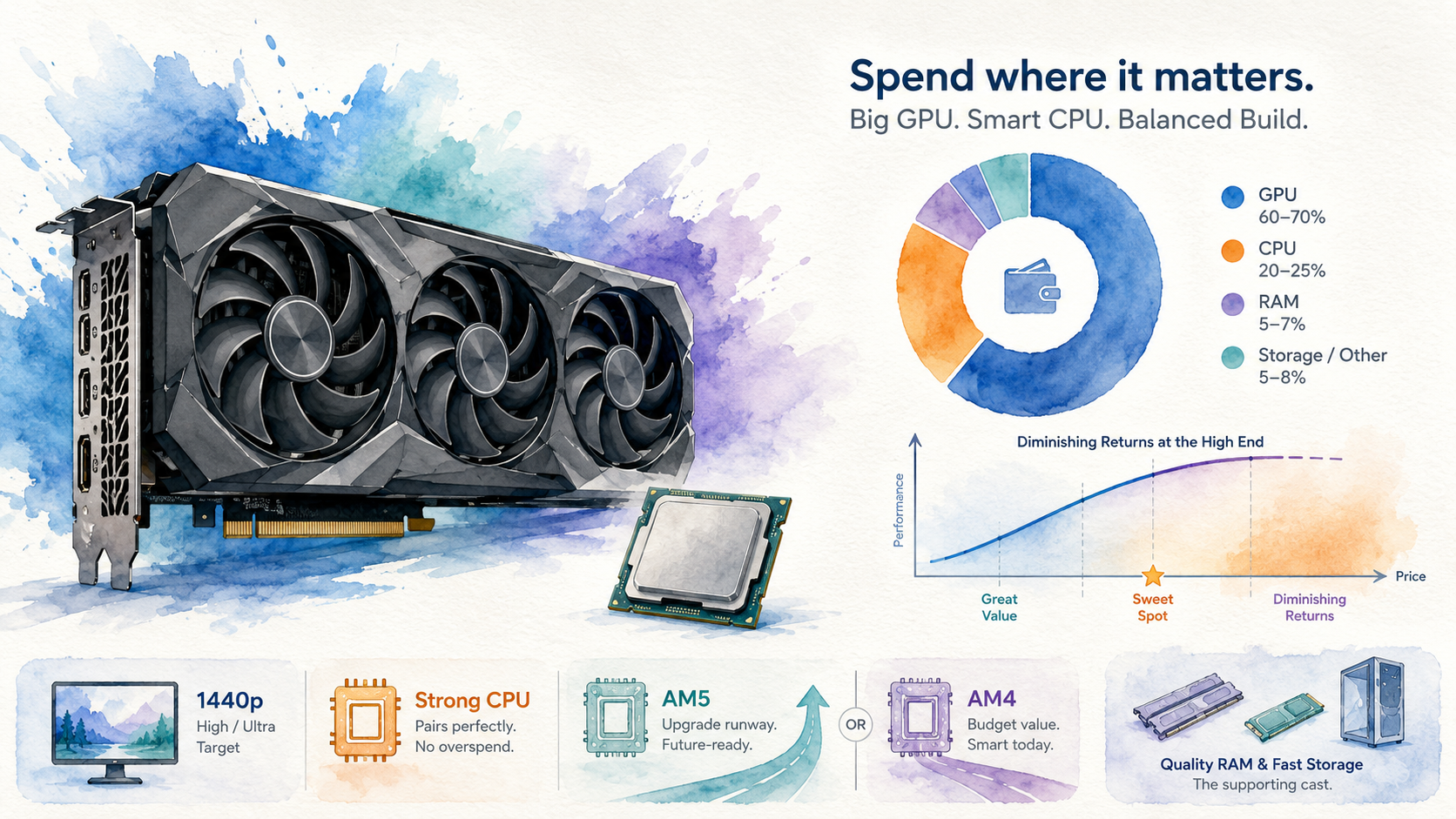
Put the bulk of your budget into the graphics card, up to whatever resolution and refresh rate you’re actually chasing. Then buy the cheapest CPU that won’t hold that card back. For a new build in 2026 that almost always means an AM5 platform and one of the more affordable Ryzen X3D chips, not the flagship one with the biggest number on the box.
Why This Actually Matters
Get the split wrong in either direction and you feel it, just at different points. Underspend on the GPU and every game reminds you about it, constantly, in the one number you actually watch. Overspend on the CPU tier instead and the money just evaporates quietly: no visible frame rate, no visible benefit, just a receipt that hurts a bit more than it needed to. Neither mistake is fatal. Both are avoidable, and the fix costs nothing beyond understanding where the diminishing returns actually kick in.
The GPU Ladder Gets Worse the Higher You Climb, on Purpose
Line up the current 1440p-capable graphics cards from AMD and Nvidia by price and something very consistent shows up: the jump from an entry 1440p card to the next tier up buys a genuinely useful chunk of extra performance for a modest bit more money. The jump after that buys a smaller percentage gain for a proportionally bigger step in price. And the jump after that is smaller still.
This isn’t a conspiracy, it’s just how the market’s always behaved. The mid-range is where price and performance line up best, because that’s where the volume and the competition both live. Above it, you’re increasingly paying for the last slice of performance rather than the average slice, and that slice gets more expensive every time.
None of that means the higher tiers are a bad buy. Going from the cheapest capable card in a given generation to the priciest one on the list does buy a genuinely higher frame rate, but the price climbs a good deal faster than the performance does. That’s not a scandal, it’s just the shape of the curve, and it’s always been that shape.
One genuine limiting factor right now is VRAM, the graphics card’s own dedicated memory that stores textures and game assets. Cards sitting right on the edge of “enough VRAM for the next few years” are a harder recommendation than their frame rate alone suggests, because a card that runs out of VRAM ages faster than one that runs out of raw grunt. If a refreshed, higher-VRAM version of a popular mid-range card lands at a similar price to the current one, it’s worth waiting a few weeks to see, rather than buying the outgoing model the day before it happens.
Why the CPU Doesn’t Need to Match the GPU’s Price Tag
Here’s the part that trips people up: CPU tiers don’t scale the same way. Once you’re above a fairly modest baseline, extra CPU spend buys you almost nothing at 1440p and above, because the GPU is doing the heavy lifting and the CPU is just handing it a steady stream of instructions to chew through.
Ryzen’s X3D chips are the clearest example of this going right now. The cheapest X3D chip in the current lineup is, frankly, an odd amount of good for the money, largely because AMD’s extra cache technology (which sits a stack of extra memory directly on the processor die, cutting down how often it has to wait on slower system RAM) delivers most of its gaming benefit even on the entry chip. Step up to the next X3D tier and you will see a genuine improvement, worth having if the budget stretches to it, but you are also paying a real premium for it.
Keep climbing and the case gets weaker. The top two X3D chips in a given generation tend to land close enough together in testing that most players would struggle to tell them apart blind, while the price gap between them is nothing like as small. That’s a genuinely hard one to justify unless you’re the kind of buyer who wants the biggest number regardless of whether you’ll ever see it on screen, which is a fine thing to want, just be honest with yourself that it’s what you’re buying.
So where does the extra CPU spend actually earn its keep? Mostly at the very top of the stack: a flagship GPU running 1080p or competitive titles at very high refresh rates, where the CPU genuinely becomes the ceiling. Everywhere below that, roughly the same money spent moving up one GPU tier instead will get you more visible improvement than moving up one CPU tier will.
AM5 or AM4: The Platform Question Nobody Enjoys Answering
This is the one that actually depends on your situation rather than having one universal right answer.
For a genuinely tight budget build today, AM4 (the older Ryzen socket) is still a defensible choice, especially if you can find one of the older X3D chips at a proper discount. You won’t be leaving frames on the table for a 1080p or entry 1440p build, and every pound saved on the platform is a pound available for the GPU, which is exactly where this whole article says it should go.
For anything you expect to still be upgrading in two or three years, AM5 is the sounder call, and it isn’t close. Once you total up the motherboard, the CPU and DDR5 memory (the newer, faster memory standard AM5 boards require), the AM5 version of a similar build tends to cost noticeably more than the AM4 equivalent, not enough to blow a sensible budget but enough to notice. What you’re buying with that premium isn’t day-one performance, it’s the runway: a socket that’s going to take at least one, likely two, more generations of CPU upgrades without a full platform rebuild.
A Quick Word on RAM and Storage, While We’re Here
Memory and SSD pricing has been genuinely unstable industry-wide, partly because a lot of manufacturing capacity that used to make consumer memory has been pulled toward data-centre demand instead. Exactly when that eases is a guess dressed up as a forecast no matter who’s making it, so treat any confident date attached to it with a healthy amount of suspicion, including any you read here.
The practical response is boring but correct: buy what you need to get a build running properly now, and don’t try to time the bottom of a market that nobody can actually call. Used RAM is a reasonably comfortable way to save some money, since it tends to fail immediately if it’s going to fail at all, which gives marketplace buyer protection an actual chance to work. Used SSDs deserve more caution: they’re more prone to failing well outside a return window, at which point there’s often no warranty left standing between you and a dead drive.
Back in the Real World
Bring this down to an actual build and the pattern holds however much you’re spending. Pick your target resolution and refresh rate first, then let the GPU spend follow from that, not the other way round. Match the CPU to the GPU tier rather than to your ego. Lean toward AM5 if this build has to last, and don’t feel bad about AM4 if the budget is genuinely tight and every pound matters more than future upgrades. Keep an eye on VRAM on any GPU you’re close to committing to. And don’t let RAM or storage anxiety push you into overspending today on parts you can quietly upgrade in six months’ time.
The Verdict
Spend the money where you’ll actually see it: the graphics card, up to the resolution and refresh rate you’re genuinely chasing. Buy a CPU that keeps pace with that card rather than one that tries to outrun it, because past a fairly low bar, extra CPU spend at 1440p and above is money your eyes can’t cash. Favour AM5 for a build with a future ahead of it, and only reach for the very top CPU tier if you’re also running a flagship GPU at settings where the processor genuinely becomes the bottleneck.
It isn’t a complicated formula. It’s just one that’s easy to get backwards when a bigger number on a box feels like it should matter more than it actually does.
Plan the actual numbers before you buy a single part, cost basis, target resolution, and where the budget should genuinely go, rather than guessing and hoping the spreadsheet in your head was right.